
DealShot Capture
Stop Guessing
Rehab Costs From Incomplete Seller Photos
Send one link. Sellers follow guided steps.
Receive more structured property visibility before underwriting begins.
Reusable seller link Guided walkthrough steps Designed to reduce missing visibility

The Problem
Incomplete Photos Create
Expensive Uncertainty
Most sellers aren’t ignoring instructions.
They’re overwhelmed, dealing with divorce, financial pressure, time constraints, and property distress. Taking structured property photos is rarely their priority. As a result, photos often arrive incomplete or inconsistent — not intentionally, but repeatedly.
No apps. No downloads. No account setup required.
when important areas are missing
Repair Estimates Become Assumptions
Missing high-cost systems mean every estimate carries hidden risk that compounds at closing.
Follow-Up Requests Increase
Every missing photo means another message, another wait, another delay before evaluation can begin.
Evaluation Confidence Decreases
Incomplete visibility creates uncertainty during underwriting, hesitation, renegotiations, missed opportunities.
Missing visibility creates uncertainty during underwriting and property evaluation.
What Happens Next
Missing Visibility Slows Decision Making
When property visibility is incomplete:

Repair Estimates Become Less Reliable

Buyer Confidence Decreases

Renegotiations Become More Common

Underwriting Takes Longer
Not because of poor decisions.
Because critical visibility is missing before evaluation begins.
The Problem
Give Sellers Structured Guidance Instead Of Open Instructions
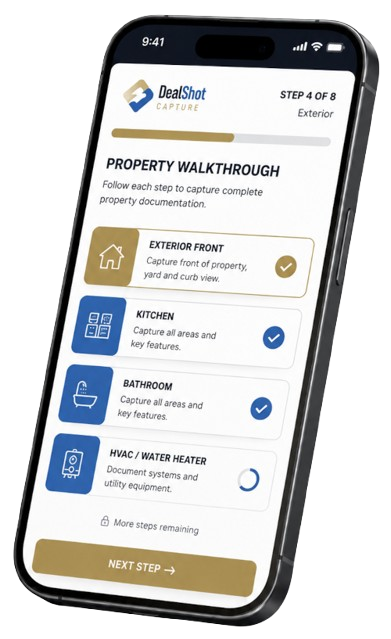
DealShot Capture walks sellers through the property step by step, directly through their phone browser. No guessing. No scattered instructions. No unclear walkthrough order.

What Areas to Photograph
Step-by-step room and system coverage eliminates guesswork for the seller.

When to Photograph Each Item
Logical walkthrough sequence ensures nothing is skipped or revisited.

What Each Shot Should Include
Clear visual guidance sets the right expectation before the shutter opens.

Photos Stay on Seller's Device
No uploads, no storage. Sellers send photos back through their normal communication method.
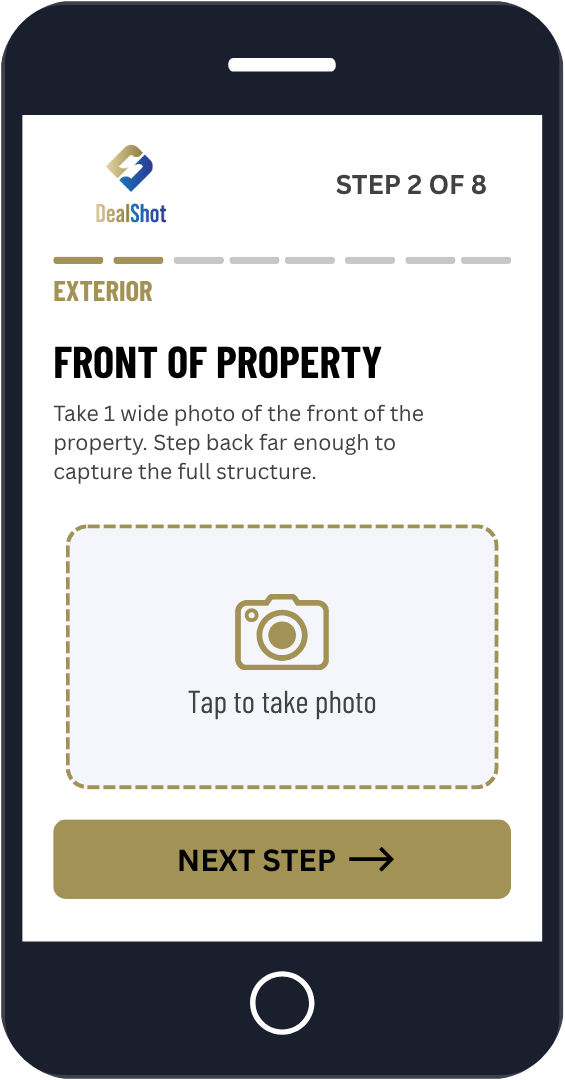
Designed from real property evaluations where incomplete visibility delayed decisions and created repair uncertainty.
HOW SIMPLE IT IS
Send One Link.
That Is It.
Reusable across multiple sellers and future deals. Most sellers complete the walkthrough in minutes once they begin taking photos.
No apps. No downloads. No account setup. No training required.
01
STEP 01

Enter Your Email
Receive your reusable DealShot Capture Seller Link.
02
STEP 02

Send The Link To The Seller
Text or email the link directly to the seller.
03
STEP 03
Seller Follows The Guided Walkthrough
The seller follows the checklist and sends photos back using their normal communication method.
WHAT YOU RECEIVE
Receive More Structured Property Visibility
Before
Random Seller Photos
- Scattered, out-of-order photos
- Missing rooms and systems
- Blurry or unusable shots
- Repeated follow-up requests
- Repair estimates based on assumptions
- Delayed underwriting decisions
After DealShot Capture
Structured Walkthrough
- Consistent, ordered photo coverage
- Full exterior and interior visibility
- High-cost systems documented
- Fewer clarification requests
- More reliable repair assessments
- Faster, more confident underwriting
Structured Walkthroughs
Reduce Missing Visibility
Most sellers do not know what investors actually need documented during property evaluation. DealShot Capture removes that uncertainty by guiding the walkthrough step by step.
Structured guidance helps reduce:
- Skipped rooms
- Incomplete exterior coverage
- Missing system visibility
- Repeated clarification requests
WHY THIS WORKS
Designed From Real Evaluation Problems
DealShot Capture was created to address operational issues repeatedly seen during property underwriting and property review:
No apps. No downloads. No account setup. No training required.
01
Sellers Don't Know What Investors Need
DealShot Capture removes that uncertainty by showing exactly what to capture, step by step, before they begin.
02
Structured Guidance Reduces Skipped Areas
Sequential prompts prevent sellers from skipping rooms, missing exterior coverage, or leaving systems undocumented.
03
No Technology Barrier for Sellers
Opens directly in the phone browser. No app store. No account. No confusion. Any seller, any phone, any deal.
04
One Reusable Link Across All Deals
Your link works for every seller and every future deal. Send it once, reuse it forever. No logistics overhead.
05
Photos Never Leave the Seller's Device
DealShot Capture doesn’t store, upload, or process any photos. Total control stays with the seller at all times.
06
Standalone - No Full App Required
DealShot Capture functions independently during this phase. Get the walkthrough value without any additional setup.
FAQ
Everything You Need to Know
Start Today
Start Using
DealShot Capture
Stop relying on scattered seller photos. Use a guided walkthrough process and reduce missing visibility before underwriting begins.